Frequently Asked Questions
Get answers to frequently asked questions.
We address everything from billing and payment questions to energy usage, understanding your bill, safety information and much more.-
How do I add, remove, or switch accounts online?
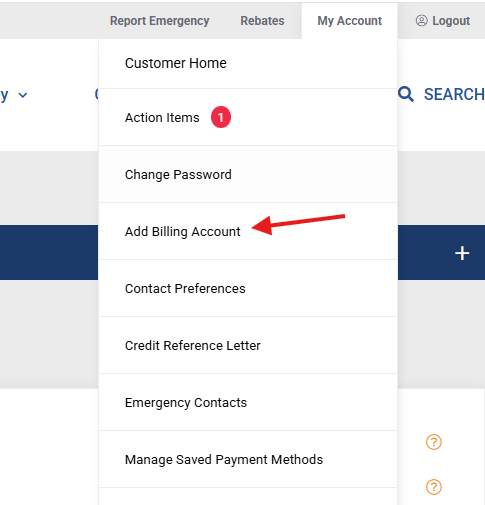
How to add an account to your profile:
- Log in to your account.
- Click on "My Account" located in upper-right of the page.
- Select “Add Billing Account”.
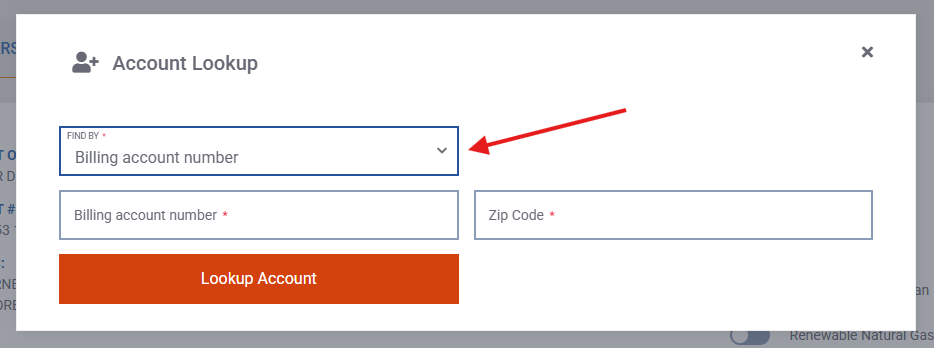
- Under "FIND BY", click on the down arrow and select from either "Billing Account Number,” “Phone Number,” or “Address."
- Enter the information requested and click "Lookup Account".
- The Account Lookup screen will appear. Please read the statement and click “OK” to complete the process.
How to switch between accounts:
- Log in to your account.
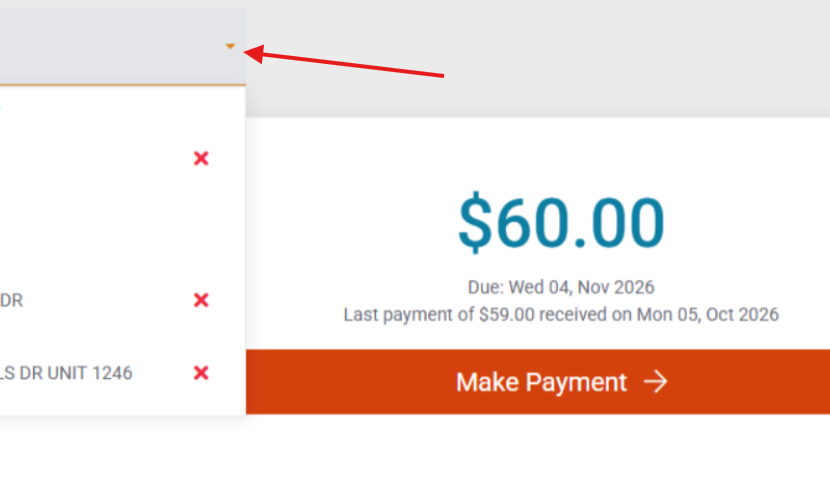
- Locate the address dropdown box found on the upper-left area above the white bill information section.
- Click on the red down arrow next to the address to view all available addresses attached to your profile.
- Click on the address you wish to access to view information for that location.
How to remove an account from your profile:
- Log in to your account.
- Locate the address dropdown box found on the upper-left area above the white bill information section.
- Click on the red down arrow next to the address to view all available addresses attached to your profile.
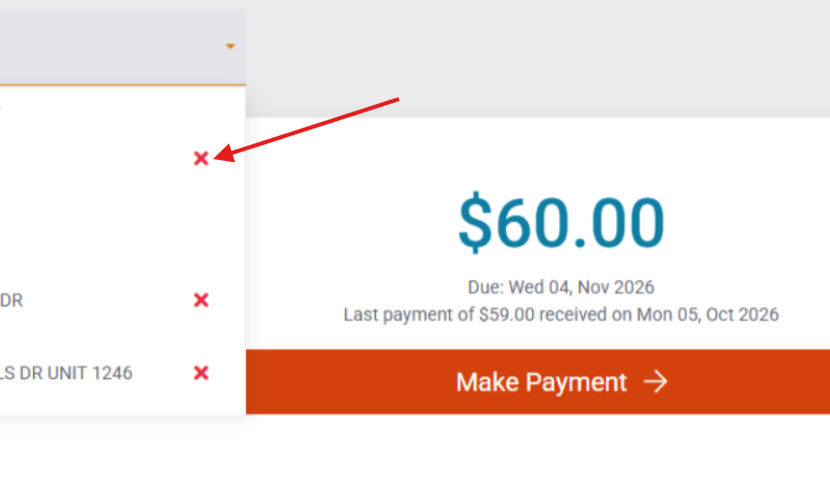
- Click the “X” next to the address you wish to remove.
- You will be asked to confirm your decision to remove the account by selecting CANCEL or YES.
-
How do I set up e-statement billing or change my preference?
- Log in to your account. Don't have an online account? Click the Create Account button on the login screen.
- On the main screen you will see an E-Statements toggle button.
- Toggle the switch to either enroll in E-Statements or unenroll.
- The green marker indicates you are enrolled when pushed to the right.
- When you unenroll a popup will be displayed. Click the “Unenroll” button to confirm.

-
How do I update my payment method?
- Log in to your account.
- Select "Manage Saved Payment Methods" from the My Account menu at the top right of the screen.
- Remove, add or update your payment methods on this screen. Only one bank account or up to five credit/debit cards can be saved.
- Be sure to click the "Save" button when finished.
NOTE: Updating your payment method does not change the status of Automatic Payments. When logged in, Automatic Payments can be turned on or off on your account page.


-
How do I start, update, or change my automatic payments?
- Log in to your account.
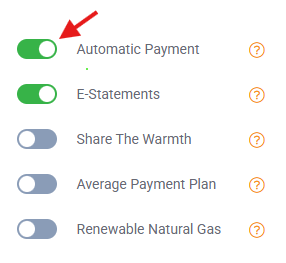
- Click on the Automatic Payment toggle to update payment method.
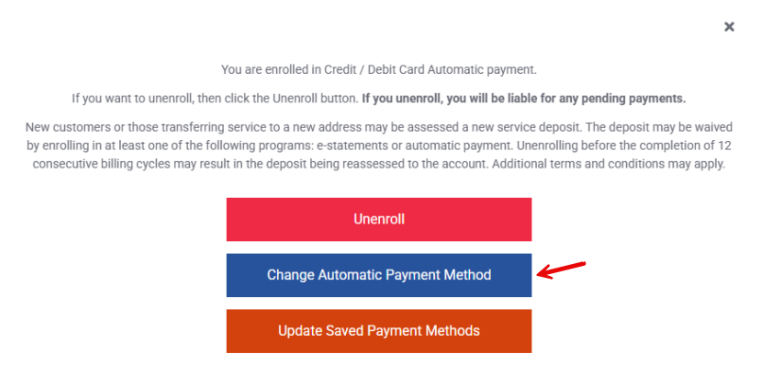
- Click on the blue “Change Automatic Payment Method" to confirm the change.
NOTE: Updating your payment method does not change the status of Automatic Payments. When logged in, Automatic Payments can be turned on or off on your account page.
-
How do I update my contact or communication preferences?
- Log in to your account.
- At the top right of the screen, click "My Account." From the dropdown menu, click "Contact Preferences."
- Make selections from the categories as shown below.
- From this screen you can also update your billing account phone numbers and E-Statement email address.

-
How can I check if my payment posted to my account?
- Log in to your account
- The lower half of your screen defaults to the "Usage" tab, but you can select "History" to change the view and see any payments that posted to the account.

-
How do I find out if I am in danger of getting disconnected? And if so, how much do I have to pay to avoid disconnection?
- Log in to your account.
- In the lower portion of the screen, you can select "Disconnect Notices" from the tabs.
- Active disconnect notices and those received in the last 12 months will appear.
- It will also indicate how much you need to pay to keep services from being interrupted.
If your service has already been disconnected for non-payment, you must call 800-700-2443 to arrange reconnection.

-
How much do I need to pay on my payment arrangement?
- Log in to your account
- On the home screen of the my account page, the customer will see the balance owed if it pertains to a Payment Arrangement on the account.

-
Why was my bill higher this month?
- Log in to your account
- Scroll down to the "Usage" tab to view the month in question. The bar chart illustrates bill amounts and natural gas usage.
-
To understand the charges that make up your monthly bill, please visit Understand Your Bill.

-
What is the Average Payment Plan?
You can reduce the fluctuations of your monthly gas bill and make budgeting easy by registering for our Average Payment Plan. The Average Payment Plan is based on a 12-month rolling average of your natural gas bill. This is a way to reduce the volatility of seasonal energy expenses by spreading out the cost throughout the year.
-
How can I get a copy of my bill? How can I view past bills?
- While there is not an option to have your bill re-sent to you through the mail, when enrolled in E-Statements, you can view your current bill and all previous bills online.
- Log in to your account
- Scroll down and select the "Statements" tab to view your current bill.
- You can also select the "History" tab then select "Bills" to see current and previous bills.

-
How do I read my bill?
We want to make it easy for you to understand the charges that appear on your bill. We created a dedicated page that provides detailed explanations on how your bill is calculated.
-
What is the balance on my account?
- Log in to your account
- On the home screen of the my account page, you will see the amount owed (1) and the total account balance (2) if you have a payment arrangement.

-
What rebates do you offer?
In compliance with state law, Texas Gas Service filed a proposal with the Railroad Commission of Texas seeking approval for a new energy efficiency and rebate program. That proposal was not approved, and as a result, Texas Gas Service is unable to offer a rebate program at this time.
-
How can I lower my bill?
-
How do I report an outage?
To report a natural gas outage, please call the emergency line at 800-959-5325.
-
What do I do if I smell gas?
To report a natural gas odor or emergency, leave the area immediately and then call 911 and 800‑959-5325.